


InSaver: All Video Downloader
4.82.58K Reviews
App Specs
- Version
- 2.9.0
- Updated On
- License
- Free
- Downloads
- 10,000,000+
- Developer
- Video Downloader Story Saver
- Categories
- Video Players & Editors
- Platform
- Android, iOS
Screenshots

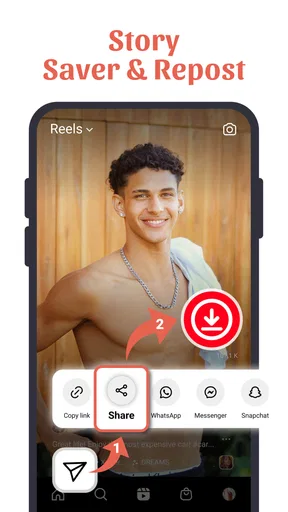
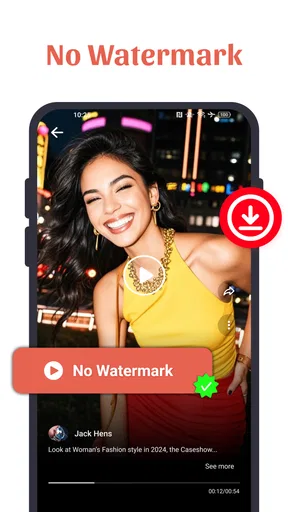
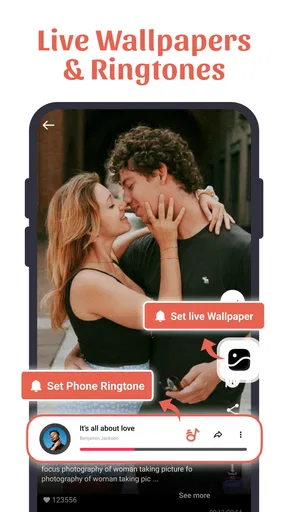
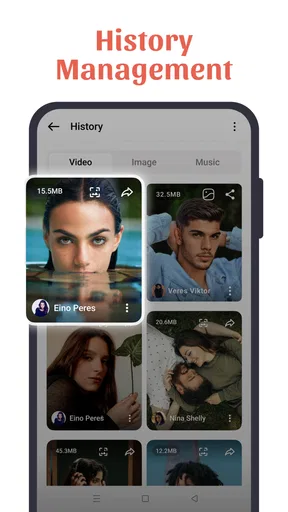
 Analysis by AppCompare
I look at InSaver as a practical shortcut for a specific habit: keeping a social clip nearby instead of having to find it again in a feed. That can be useful when a creator shares a recipe, a short tutorial, or a funny moment that I want to revisit without scrolling through an account’s posts. The trade-off is just as important: a downloader is only worthwhile when it works with the source and when saving the content is appropriate. I’d treat it as a handy personal tool, not a replacement for the social apps where videos are published.
Where it fits among video apps
InSaver: All Video Downloader sits in the video player and editing category, though its main appeal is collecting clips rather than editing them. The developer is Video Downloader Story Saver, and the app is free to start. Its average rating is 4.8 from around 221,000 ratings, with more than 5 million installs; those figures suggest that saving social content is a common use case, but they don’t guarantee that every link will work equally well.
Compared with the usual alternatives, the appeal is convenience. A platform’s own save or bookmark option is often better if I only need to find a post later: it keeps the item tied to its original account and avoids using up phone storage. InSaver is more relevant when I want an offline copy for personal viewing. A browser-based downloader may avoid installing another app, but it can involve extra steps and less predictable handling on a phone. I’d choose the simplest method that meets the need rather than downloading everything just because I can.
A small workflow makes a difference
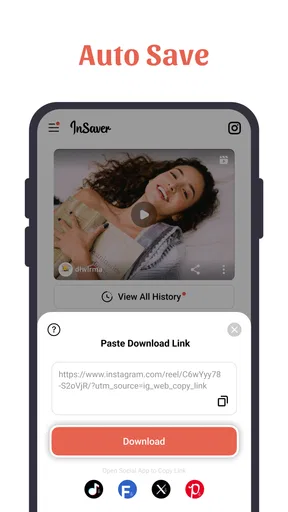
The basic copy-and-paste approach is easy to understand, but I’d use it deliberately. Before opening the app, I’d copy the post link from the social platform, then switch to InSaver and paste it. If the link doesn’t resolve, I’d first check that it is the link to the actual post rather than a profile or a shortened address, and that the post is still available to me in the original app. That quick check can save time and avoids mistaking a source-access problem for a broken download.
For a collection of clips, I’d also separate “save now” from “keep forever.” A queue is useful when I have several links ready, but it can turn into a pile of files that I never watch. I’d download only the clips I expect to use offline, then review the gallery afterward and remove duplicates or items that no longer matter. This is especially helpful when saving several versions of a similar recipe or exercise demonstration: keeping one clear reference is often more useful than keeping every repost.
Everyday uses beyond casual scrolling
A realistic example is planning a weekend meal. I might see a short cooking demonstration during a commute, save the post link, and download the clip later on Wi-Fi so I can follow the steps in a kitchen with poor reception. The same pattern can suit a travel explainer, a language-learning snippet, or a craft demonstration that is easier to replay than to describe in notes. In each case, the value is not simply having a file; it is being able to return to a useful visual reference at the moment I need it.
There is a useful distinction between saving a video and preserving its context. A downloaded clip may be convenient, but it may not carry the caption, comments, creator details, or links that explain what is shown. If the instructions depend on a written ingredient list or a correction in the comments, I’d keep the original post bookmarked too. That combination is more reliable than assuming the video alone contains everything important.
Worth Reading Before You Choose

EA SPORTS FC Mobile 26 Is a Bigger Football Game, but It Takes Time

Flipboard Shows What News Apps Must Do Beyond the Feed

Switching to Android Auto Means Rethinking Your Driving Routine

Google Calendar Makes a Crowded Week Easier to Manage

Ludo King Makes the Most of the Minutes Between Plans

Baby Panda World Brings Quick Play to Modern Phones, but Its Game Library Feels Busy
Permissions, ownership, and sensible use
I would not assume that a downloader’s presence makes every public-looking video free to reuse. Saving a clip for private offline viewing is different from reposting it, editing it into another project, or presenting it as my own. I’d respect the creator’s rights and any platform rules, and ask permission when I want to share someone else’s work beyond the original service. That boundary matters more than the convenience of the download button.
I’m also cautious about blanket claims that an app is secure or asks for no unnecessary permissions. Those are not things I can responsibly infer just from the ability to download a clip. My practical advice is to review the permission prompts on your own device, grant only what makes sense for the task, and avoid entering social account credentials into a tool unless you have a clear reason to trust that flow. If a link or download behaves unexpectedly, stop rather than repeatedly granting access or trying unrelated workarounds.
Easy Peasy Downloads
First off, let me just say how incredibly easy it is to use InSaver. No complicated steps here. You just copy the link of the video you want, paste it into the app, and voilà! It magically appears in your phone’s gallery. Seriously, it’s like having a superpower for your social media browsing. The interface is clean and straightforward, so even if you’re not the most tech-savvy person, you’ll have no trouble navigating it.
Supports Multiple Platforms
What I really love about this app is that it supports a wide range of social media platforms. Whether you’re trying to download from Instagram, Facebook, Twitter, or TikTok, InSaver has got your back. It’s like an all-in-one tool for video lovers. Plus, you don’t have to worry about the video quality being compromised. The app ensures that you get the videos in their original quality, which is a huge plus!
Batch Downloads
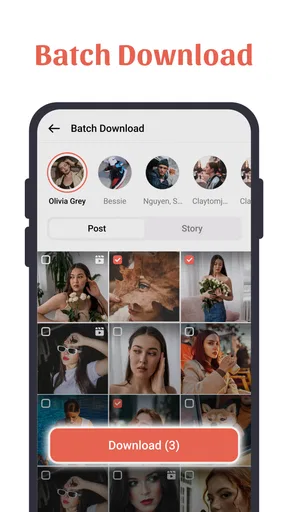
Now, if you’re anything like me, you might find yourself wanting to download multiple videos at once. Well, guess what? InSaver lets you do just that. You can queue up a bunch of videos and download them all in one go. It’s super convenient, especially if you’re planning to binge-watch later.
Offline Viewing
One of the biggest perks of using InSaver is the ability to watch videos offline. You can save your mobile data and watch your favorite clips whenever and wherever you want. Whether you’re on a flight or stuck in a place with no internet, this feature is a lifesaver. Just download the videos when you have Wi-Fi, and you’re all set.
Free with Optional Upgrades
The app is free to use, which is always a bonus. However, if you want to get rid of ads or unlock some additional features, there are in-app purchases available. Honestly, the free version works just fine for most users, but the upgrades are there if you want them.
Secure and Private
In today’s world, privacy is everything. The developers of InSaver have made sure your data is safe and secure. The app doesn’t ask for unnecessary permissions, and you don’t have to worry about your personal information being compromised. It’s always nice to know that your privacy is being respected.
For someone deciding whether to try it, I’d also weigh the cost and support expectations realistically. The app is free, but its in-app purchases range from $1.99 to $29.99 per item, so I would check what an upgrade actually unlocks before paying. I wouldn’t buy anything simply on the assumption that it will make every source compatible or guarantee a particular download quality. The version is 2.6.7, and it runs on Android 7.0 or later; it is rated for Everyone. Those details make it approachable for many Android users, but they don’t remove the need to check how it behaves on your own device.
Who will appreciate it—and who may not
I can see the clearest fit for people who regularly collect short clips as personal references: students revisiting a visual explanation, home cooks following a technique, or travelers preparing a handful of useful clips before a trip. The app’s straightforward link-based workflow makes more sense for that occasional, intentional collection than for someone trying to archive an entire feed. If I only want to remember a post, I’d use the platform’s bookmark feature instead; it is usually tidier and keeps the creator and discussion attached.
It is also not the right choice for someone who expects a universal download button that works with every post in every circumstance. Social platforms can change how links and access work, and content may be unavailable or restricted. When that happens, I’d avoid repeated attempts and use the platform’s own viewing options. Anyone who needs formal media management, reliable organization across a large library, or editing tools should look for an app built specifically for those tasks rather than expecting a downloader to cover them.
Practical limits to keep in mind
Downloaded files can take up space, and a phone gallery is not automatically a well-organized archive. Before saving a long queue, I’d make sure I actually want offline copies and occasionally clear out clips I no longer need. I’d also test the process with one nonessential link before relying on it for a trip or a presentation. That small trial helps me learn where the resulting file appears and whether it plays as expected, without turning a useful last-minute task into a scramble.
Another trade-off is that an offline copy can become outdated. A tutorial may be corrected, a recipe may change, or the creator may add important context after posting. For anything where accuracy matters, I’d keep the original post accessible and treat the saved clip as a convenient copy, not the definitive source. This is a small habit, but it prevents an old download from quietly replacing the latest information.
My recommendation
Overall, InSaver: All Video Downloader is a sensible option if you often want a few social clips available away from a connection and are comfortable using a link-based process. Its appeal is ease rather than deep media management, and that is enough for a focused personal use case. I would recommend trying the free version with a clip you have permission to keep, checking the result and the app’s prompts, and deciding about any upgrade only after seeing whether it solves a real need for you.
The short version of my verdict is that it suits deliberate saving better than indiscriminate collecting. Use platform bookmarks when context and easy rediscovery matter most; use InSaver when an offline copy is genuinely useful. If that distinction matches how you browse, it is worth a look. If you need guaranteed access to every post, a polished archive, or permission to reuse other people’s work, this is not the tool I’d rely on.
Pros
- Supports multiple video platforms.
- Fast download speeds enhance user experience.
- User-friendly interface simplifies navigation.
- Allows batch downloads for efficiency.
- Includes built-in video player for previews.
Cons
- In-app ads can be intrusive.
- Limited features in the free version.
- Occasional download failures reported.
- Requires stable internet for smooth use.
- Not available on all devices.
FAQs for InSaver: All Video Downloader
What types of videos can I download with InSaver: All Video Downloader?
InSaver: All Video Downloader allows you to download videos from a variety of platforms including social media and video-sharing sites. Whether it's short clips, live streams, or longer videos, this app supports multiple formats and resolutions, ensuring compatibility with your device's storage and playback capabilities.
Is InSaver: All Video Downloader free to use?
The app offers a free version that provides basic downloading features. However, there might be in-app advertisements. For an ad-free experience and additional features like batch downloading and higher resolution options, users can opt for the premium version through in-app purchases.
How do I ensure the videos I download are legal and safe?
InSaver encourages users to respect copyright laws and terms of service of the platforms they download from. It’s important to ensure that you have permission to download or share any content. Always check the platform’s guidelines and use the app responsibly to avoid legal issues.
Can I use InSaver: All Video Downloader on both Android and iOS devices?
Yes, InSaver is available for both Android and iOS platforms. Ensure that your device meets the minimum OS requirements for the app. Regular updates are provided to enhance compatibility and performance, so keeping your app updated is recommended for the best experience.
What are the privacy considerations when using InSaver: All Video Downloader?
InSaver requires certain permissions to function optimally, such as access to storage for saving videos. The app claims to prioritize user privacy by not collecting personal data without consent. It’s advisable to review the app’s privacy policy to understand how your data is handled and ensure your privacy preferences are respected.


